
A cyber-attack can happen to anyone. The best way to be safe is to understand how cyber criminals do it.
When you are best placed to identify malicious software/payload and understand how to eradicate such malware from your environment, you will be of great value to keep your organization safer. As cyber-attack vectors evolve, all staff need knowledge on how to stay safe online. Malicious software/applications or beacons also known as payloads, are executable programs that aim at creating a communication channel between a target system and cyberattackers’ systems.
The motive behind the creation of these payloads determines the efforts of delivery to the target systems. Depending on the type and capability of a beacon, it is how a threat actor can gain a direct line into your network, maintain that line of communications, and carry out their illicit intentions and objectives.
What happens during the attack?
Once a threat actor has designed and implemented the infrastructure and related setup, their malicious campaign is ready to begin. To do this, the threat actor will need their beacons or payloads to execute inside the victim network. Then they can gain access, maintain a foothold and carry out their objectives.
To affect this kind of communication and network breach, attackers ensure that communications out of their infrastructure are anonymized, that is, bounced through a series of proxy servers to hide their true identity. It’s akin to a thief coming to your home at night dressed as a clown so that no one can identify them even on camera!
To catch a thief, you need to first think like one. Let’s walk through some of the important steps from an attacker’s point of view.
To start, here’s a look at generating the desired payload:
a). After determining the capability of the vulnerability, attackers use exploits from online sites such as Exploit Database (https://www.exploit-db.com), or develop their exploits using exploitation tools such as Metasploit or buy exploits from freelancers all over the dark web.
b). A utility called msfvenom is used to create malicious payloads to be shared using selected delivery methods to targeted machines (with particular platforms-after analysis of the same is made during the information gathering phase.)

Figure 1:payload creation (malicious application)
c) Select the Method for Delivering, Local or Remote
Attackers perform remote exploitation over a network to exploit vulnerabilities existing in the remote system to gain shell access. If attackers have prior access to the system, they perform local exploitation to escalate privileges or execute applications in the target system.
An attacker creates a directory on the attacker’s web server just to avail the malicious applications and or any software for remote delivery to remote targets.
After the server envelope (folder on the web server) is created, the malicious payload is copied to the created envelope on the webserver for accessibility on the remote end. The server is then started and the status of the server running is captured below;
d). Generate and Deliver the Payload
Attackers, as part of exploitation, generate or select malicious payloads using tools such as Metasploit and deliver them to the remote system either using social engineering or through a network. Attackers inject malicious shellcodes in the payloads, which, when executed, establish a remote shell to the target system.
Figure 2: Gaining remote connection with the target machine
e). Gain Remote Access After generating the payload, attackers run the exploit to gain remote shell access to the target system. Now, attackers can run various malicious commands on the remote shell and control the system.
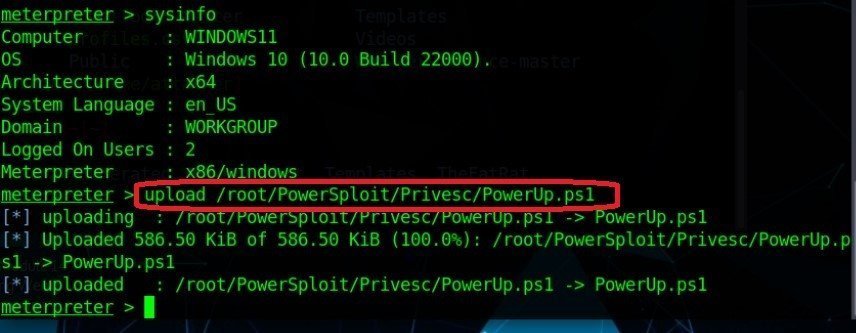
Attackers can upload a PowerShell script that could enable them to elevate their privileges in the target system and be able to control the system;
Figure 3: uploading malicious scripts to the target machines
Figure 4: executing the malicious tool on the target system remotely
For example, getting access to the GUI of the target system through a VNC connection is now possible by running the “run vnc” on the meterpreter session console; This will open a GUI page of the state of the target system on the attacker’s end and could attract further attack attempts on the target system.
Conclusion
We have highlighted some considerations and actions involved in a threat campaign and its associated malicious communications. We hope this gives you some insight into how and why a threat actor uses certain techniques.
The steps discussed related to the attack cycle are categorized into three phases:
- Initial entry
- Execution
- Command-and-control
The best way to counter an attack and approach mitigation strategies is to apply the assume an attacking philosophy. That is, assume that the attacker is already in and that therefore, your key security objectives should be detection and containment.
You want to minimize damage. In the next issue, we analyse how you create a cyber resilience set-up to make it difficult for attackers to roam freely within your network like homeowners.
Copyright Summit Consulting Ltd cybersecurity team. All rights reserved.



0 comments
Leave a comment